Adding Receipts to Expenses

Adding Receipts to Expenses

SiFi makes receipt handling effortless with automatic line item extraction, async processing, and bulk upload matching. You just upload receipts, and SiFi takes care of the rest.


🧾 How It Works

1. Auto-Populated Line Items

  • Once a receipt is uploaded, SiFi’s system automatically:

    • Extracts merchant, amount, date, and VAT

    • Populates line items (items, quantities, prices) into the expense form

  • Saves you time and reduces manual errors.


2. Missing Receipt Indicator

  • If an expense has no receipt attached, it will appear greyed out in the Expenses list.

  • Click the receipt icon directly to upload a missing document.


3. Asynchronous Processing

  • Receipts are processed in the background.

  • You can upload and move on — no need to wait on-screen.

  • Notifications will update once the receipt is fully processed.


4. Bulk Upload Support

  • Drop multiple receipts at once → SiFi processes them automatically.

  • The system tries to auto-match receipts to the right transactions.

  • Great for monthly batch uploads or scanning multiple receipts at once.


5. Unmatched Receipts

  • If a receipt can’t be matched, it will appear in your Inbox with suggested matches.

  • Simply review and confirm the correct match.

📲 Uploading Receipts

Method 1: Mobile Camera Capture

  • Click on expense

  • Tap Add Receipt → Take Photo.

  • Use flat surface, good lighting, and include corners.

  • Select expense → Add Receipt → From Gallery.

  • Supports multiple images at once.

Method 3: Desktop Upload
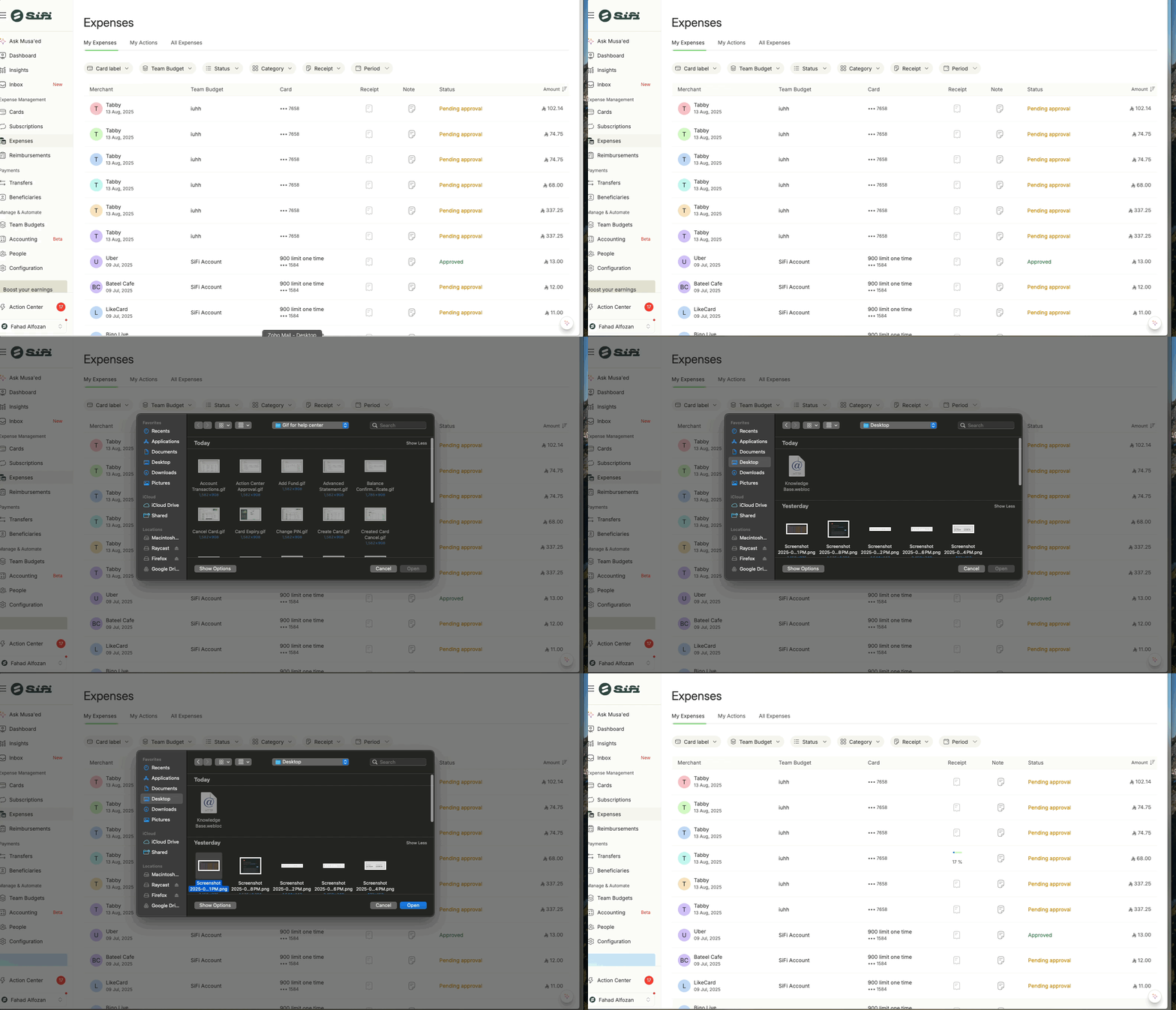

  • Click Upload Document.

  • Drag/drop or browse files (PDF, JPG, PNG, HEIC).

Method 4: Email Forwarding or bulk upload


    • Related Articles

    • 💳 Understanding Expenses vs Reimbursements in SiFi

      🔎 Overview SiFi helps you manage business spending in two ways: Expenses → When you pay using a SiFi Corporate Card. Reimbursements → When you pay with personal funds and later request repayment. Understanding the difference ensures faster ...
    • 📤 How to Export All Expenses in SiFi

      SiFi makes it easy to export your company’s expenses for reporting, analysis, or accounting purposes. You can generate a CSV file directly from the platform that contains all expense details. 📥 Steps to Export All Expenses Log in to your SiFi ...
    • 📥 SiFi Receipt Inbox

      The SiFi Receipt Inbox is your central hub for managing expense receipts. Whether you drag and drop receipts in bulk or forward them via email, Musa’ed AI automatically attaches each receipt to the correct expense and extracts all relevant details. ...
    • 🛡️ Create and Manage Expense Submission Policies

      An Expense Submission Policy defines which fields employees must complete before submitting an expense or request in the SiFi application. This ensures: ✅ Consistency across teams ✅ Policy compliance ✅ Audit readiness Admins and Finance Managers can ...
    • 🔒 Card Lock for Missing Receipt

      To enforce compliance, SiFi can automatically lock cards if receipts are not submitted within a defined number of days. This ensures: Timely expense reporting Fewer policy violations Better audit readiness How It Works SiFi continuously tracks all ...