💵 How to Withdraw Funds from SiFi to Your Company Account

💵 How to Withdraw Funds from SiFi to Your Company Account

SiFi allows you to withdraw money from your SiFi wallet directly to your company’s designated bank account. For security and compliance reasons, withdrawals are only possible to the IBAN provided during onboarding (must be owned by your company).


📝 Steps to Withdraw Funds
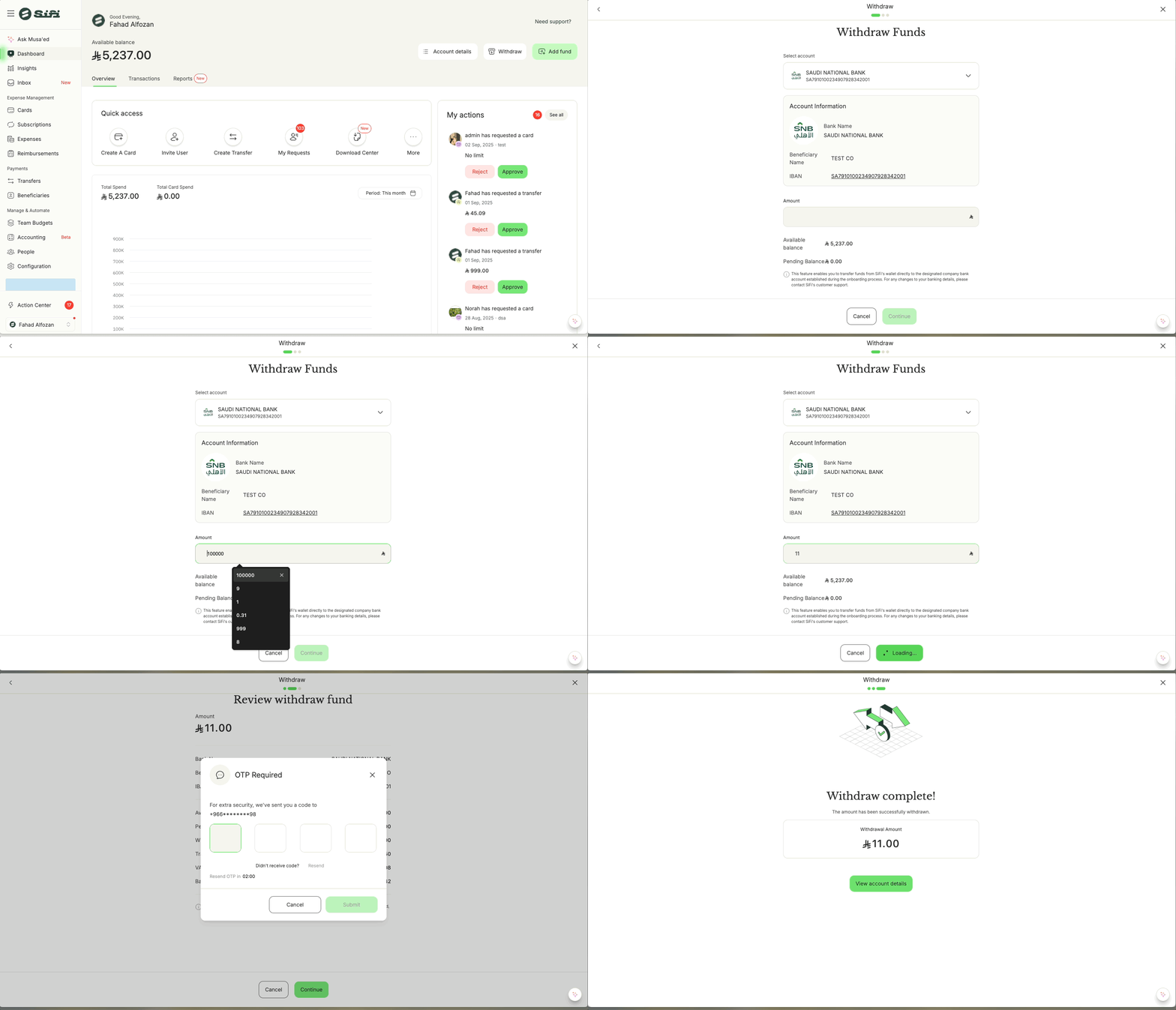

  1. Log in to your SiFi account.

  2. Go to the Withdraw Funds section (from Dashboard or Wallet).

  3. Select the company account (IBAN) you wish to withdraw to.

    • Only the account linked during onboarding will be available.

  4. Enter the amount you want to withdraw.

    • You can see your Available Balance and Pending Balance displayed.

  5. Review the withdrawal details:

    • Bank Name

    • Beneficiary Name (your company)

    • IBAN

  6. Click Submit.

  7. Complete OTP verification (One-Time Password sent to your registered number).

  8. Once confirmed, funds will be transferred via Sarie to your company account.


⏱ Processing Time

  • Withdrawals are processed as normal Sarie transfers.

  • Typically, funds arrive within minutes during business hours.

  • Transfers made after hours, weekends, or public holidays may be processed on the next business day.


⚠️ Important Notes

  • Withdrawals can only be made to the registered company IBAN provided during onboarding.

  • If you need to update or change your company bank details, please contact SiFi Customer Support at support@sifi.sa or 920031030.

  • Ensure that your available balance covers the withdrawal amount, pending balances cannot be withdrawn until settled.


    • Related Articles

    • 💰 How to Add Funds to Your SiFi Wallet

      Adding funds to your SiFi account is simple and only takes a few steps. Once funds are added, they will be available for use across cards, budgets, and transfers. 📝 Steps to Add Funds Log in to your SiFi account. From the Dashboard, click on “Add ...
    • 💸 Move Money to Sub Account Budget or Card Within SiFi

      SiFi makes it easy to move money between accounts, budgets, and cards so you can allocate funds where they’re needed. You can do this directly from your Dashboard, Account details, Cards, or Budgets page. 📝 Steps to Move Money Log in to your SiFi ...
    • 💳 Funding a Sub-Account Card in SiFi

      Sub-account cards are special cards that allow you to allocate and control funds separately from the main account. ✅ Only Admins and Finance Managers can move money into sub-account cards. 📌 Note: Sub-account cards are enabled only on request — they ...
    • 📑 How to View & Download Account Transactions in SiFi

      Your Account Transactions section provides a full overview of all money movements within your company’s primary SiFi account. This ensures transparency, easier reconciliation, and complete visibility into financial activities. 📝 What You Can See in ...
    • 🚀 Getting Started: Setting Up Your SiFi Platform

      To make the most of your SiFi platform, there are a few essential steps you need to complete during setup. These steps ensure your company can start using SiFi smoothly for expense management, reimbursements, and card controls. ✅ Step 1: Set Up Your ...