📊 How to View Allocated Money in Sub-Account Cards & Budgets
SiFi gives you full visibility of how your total company balance is distributed across budgets and sub-account cards. You can track all allocations directly from the Account Details page.
📝 Steps to View Allocated Money
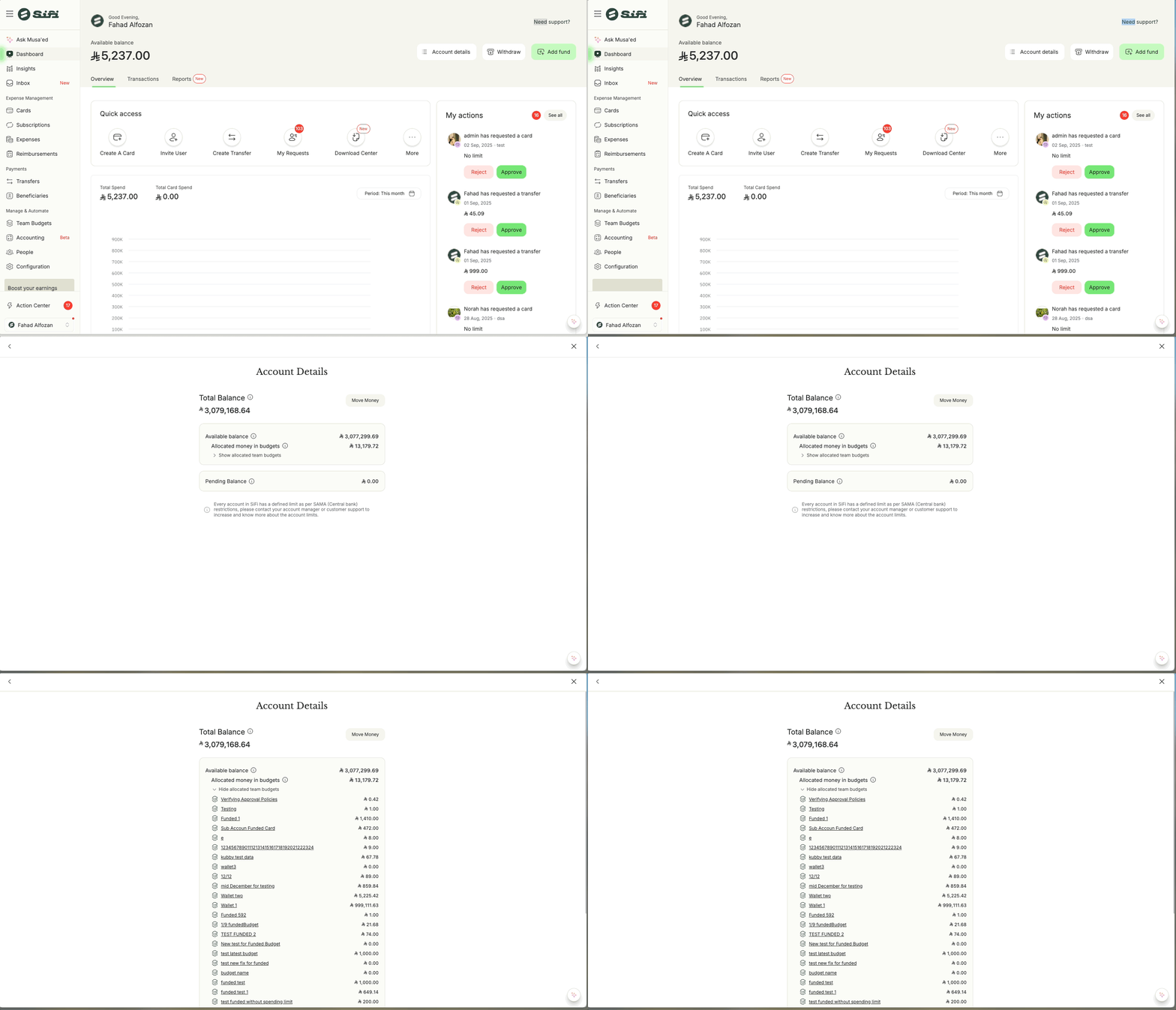
-
Log in to your SiFi account.
-
Go to the Dashboard.
-
Click on Account Details (next to your total balance).
On the Account Details page, you’ll see:
-
Total Balance – your company’s full balance in SiFi.
-
Available Balance – funds that are free and not allocated.
-
Allocated Money in Budgets – breakdown of funds assigned to team budgets.
Allocated Money in Cards - breakdown of funds assigned to sub account cards.
-
📋 What You’ll See
-
Each budget or sub-account card is listed with the allocated amount.
-
You can expand or collapse the list by clicking “Show/Hide allocated team budgets.”
Example:
-
Sub Account Funded Card → ﷼ 461.00
-
Wallet 1 → ﷼ 999,111.63
-
Testing Budget → ﷼ 1.00
-
This view ensures you know exactly where your company funds are allocated at any given time.
🎯 Benefits
Transparency → Clear visibility of funds across all budgets and cards.
-
Control → Easily identify budgets with unused balances.
-
Efficiency → Helps Admins and Finance Managers redistribute funds when needed.
-
Audit-ready → Shows a complete allocation trail for compliance and reporting.
💬 Still have questions about allocations? Contact support@sifi.sa or call 920031030.
Related Articles
💳 Funding a Sub-Account Card in SiFi
Sub-account cards are special cards that allow you to allocate and control funds separately from the main account. ✅ Only Admins and Finance Managers can move money into sub-account cards. 📌 Note: Sub-account cards are enabled only on request — they ...💸 Move Money to Sub Account Budget or Card Within SiFi
SiFi makes it easy to move money between accounts, budgets, and cards so you can allocate funds where they’re needed. You can do this directly from your Dashboard, Account details, Cards, or Budgets page. 📝 Steps to Move Money Log in to your SiFi ...📑 How to View & Download Account Transactions in SiFi
Your Account Transactions section provides a full overview of all money movements within your company’s primary SiFi account. This ensures transparency, easier reconciliation, and complete visibility into financial activities. 📝 What You Can See in ...SiFi Cards 3DS
🔒 What is 3D Secure (3DS)? 3DS (3-D Secure) is an extra security layer used for online card transactions. It was developed by Mastercard, Visa, and other global networks to protect both cardholders and merchants against fraud. Instead of only ...💵 How to Withdraw Funds from SiFi to Your Company Account
SiFi allows you to withdraw money from your SiFi wallet directly to your company’s designated bank account. For security and compliance reasons, withdrawals are only possible to the IBAN provided during onboarding (must be owned by your company). 📝 ...