📑 Expense Audit Document in SiFi
SiFi makes audits easier by providing a comprehensive Expense Audit Document. This feature lets you download all expenses, reimbursements, and transfers in one audit-ready PDF file complete with receipts and transaction details.
📝 What Is the Expense Audit Document?
The Expense Audit Document is a consolidated report that includes:
-
✅ All expenses during the selected period
-
✅ All reimbursements
-
✅ All transfers
-
✅ Attached receipts and supporting documents
-
✅ Full transaction details (amount, type, date, status, description, budget, etc.)
It’s designed to give auditors, finance teams, and compliance officers everything they need in one place — no need to piece together multiple reports.
📥 How to Download the Expense Audit Document
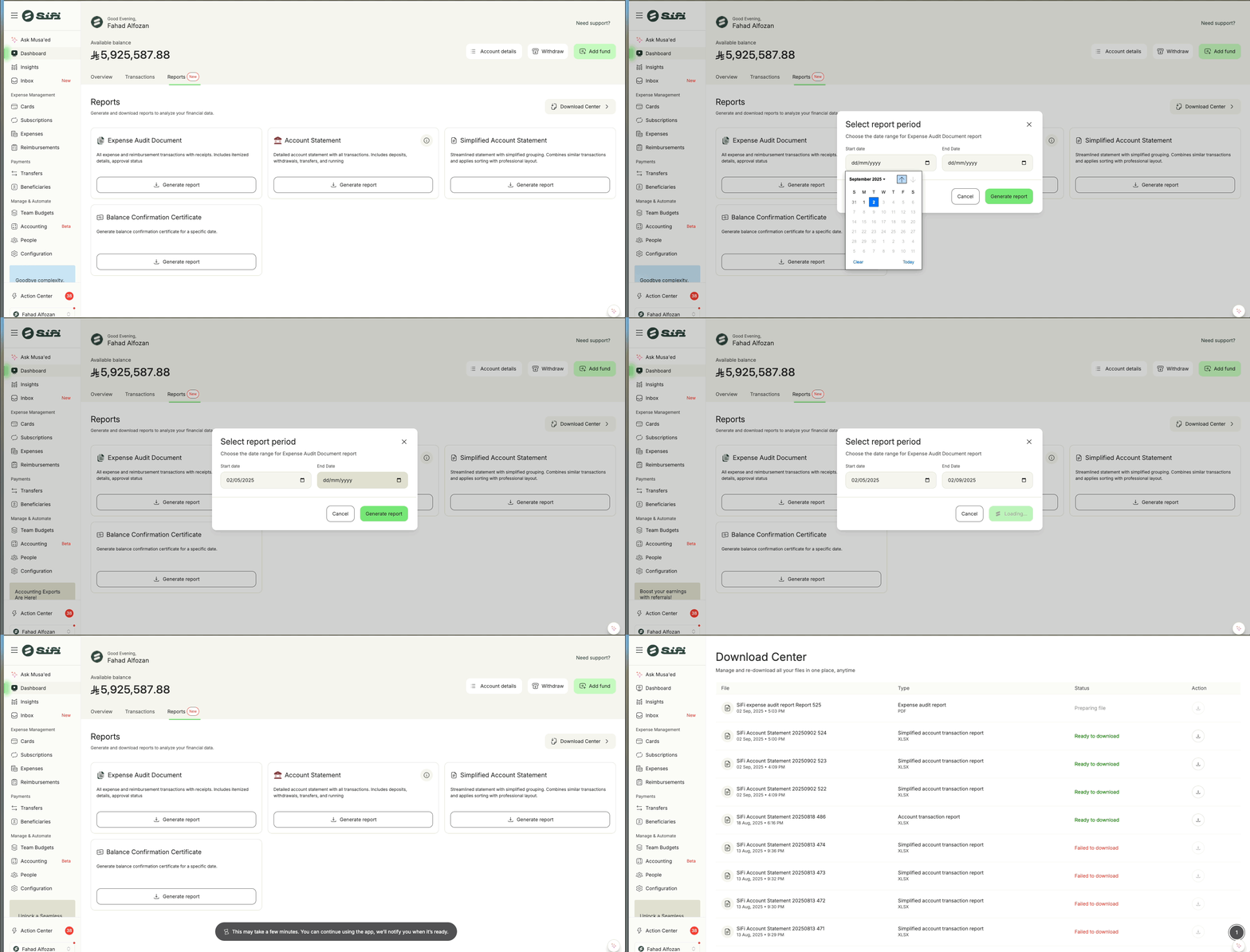
Log in to your SiFi account.
-
Go to the Reports section.
-
Select Expense Audit Document.
Choose the time frame you want to audit (e.g., monthly, quarterly, annually).
-
⚠️ For best performance, we recommend selecting 3 months or less if you have a large number of transactions.
-
-
Click Generate Report.
The system will begin preparing your file.
-
If you have many transactions, it may take a few minutes.
-
-
Once ready, go to the Download Center (in Reports or Profile menu).
-
Click Download to retrieve your PDF.
🎯 Benefits of the Expense Audit Document
Audit-ready format → All financial activity consolidated in one file.
-
Time-saving → No need to export expenses, reimbursements, and transfers separately.
-
Compliant → Includes receipts and detailed breakdowns required for audit trails.
-
Flexible → Choose the time period you want (monthly, quarterly, annual, or custom).
-
Transparent → Full visibility into every transaction, status, and receipt.
🛡️ Notes
Large reports may take longer to generate depending on the number of transactions.
-
The PDF format ensures receipts and transaction details are bundled together for easy archiving and sharing with auditors.
-
For internal analysis, you can still use CSV exports for expenses, reimbursements, and transfers separately.
💬 Need help with audit reports? Contact support@sifi.sa or call 920031030.
Related Articles
📂 Download Center in SiFi
The Download Center is your one-stop hub to manage, track, and re-download all reports and files you generate in SiFi. Instead of downloading reports immediately after generating them, you can always return to the Download Center to access your files ...📑 Balance Confirmation Certificate in SiFi
SiFi allows you to generate a Balance Confirmation Certificate directly from the platform. This certificate provides an official record of your account, budget, or sub-account card balance on a specific date — ideal for audits, reconciliations, or ...🚀 Getting Started: Setting Up Your SiFi Platform
To make the most of your SiFi platform, there are a few essential steps you need to complete during setup. These steps ensure your company can start using SiFi smoothly for expense management, reimbursements, and card controls. ✅ Step 1: Set Up Your ...📑 How to View & Download Account Transactions in SiFi
Your Account Transactions section provides a full overview of all money movements within your company’s primary SiFi account. This ensures transparency, easier reconciliation, and complete visibility into financial activities. 📝 What You Can See in ...Spend Insights in SiFi
SiFi’s Spend Insights provides a clear, real-time view of your company’s spending patterns. With interactive dashboards, you can track spend by merchants, employees, cards, and team budgets, while also spotting spend trends over time. This ensures ...